
The Zone Fitness App puts your membership in your hands. Book classes, manage your account, and stay updated – all from your phone. Click on below to download the app:


How to Register
Getting started is quick and easy:
- Download the Zone Fitness App.
- Open the app and select Login.
- Username: South African ID / Passport number
- Temporary password: South African ID / Passport number
- You will be prompted to change your password after logging in.
⚠️ Please ensure your ID / Passport number matches the one used when signing up at the club.
If you experience login issues, contact your nearest Zone Fitness branch for assistance.
Digital Access Made Simple
Your phone is your membership card.
After logging in:
- Tap Profile
- Select Digital Access – bottom right
- Scan your QR code at the entrance
Quick. Secure. Convenient.

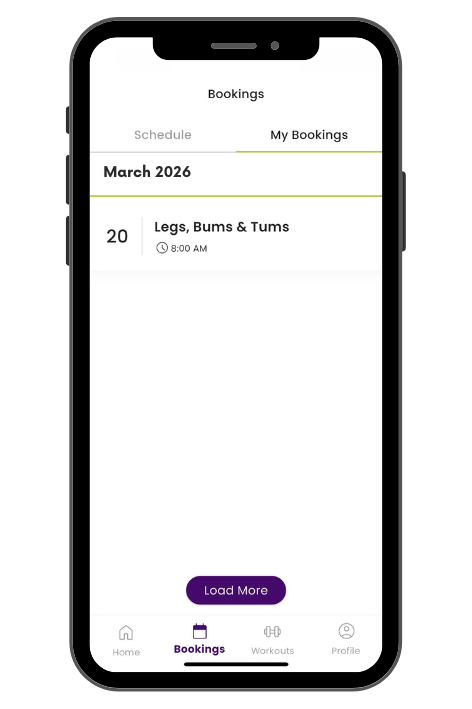
Book Your Group Training Classes
Secure your spot in just a few taps.
- Open the Zone Fitness App
- Tap Bookings
- View the class schedule
- Select your preferred session
- Confirm your booking
Stay consistent. Stay accountable. Never miss your session.
Need Assistance?
If you experience any issues accessing the Zone Fitness App, generating your QR code, or booking classes, please speak to reception at your home branch.
Our team will gladly assist you in getting set up and ready to train.
Please Note
- Your QR code refreshes automatically for security purposes.
- Ensure your screen brightness is turned up when scanning at the entrance.
- Class bookings are subject to availability.
- Your membership must be active and in good standing to access the club and book sessions.
- Your ID number must match the one used when registering at the club.
Train smarter. Stay connected. See you in the club.
